

What are BX fonts?
What a BX font is, stitch BX fonts versus native (Digitizer) BX fonts and Embrilliance's own Native fonts, how to tell which you have, and what ThreadReady does with the file.
Overview
BX is the font format of Embrilliance, the embroidery software many shops use on their computers. Font designers sell lettering as .bx files so it can be installed in Embrilliance and typed like any keyboard font, instead of placing one letter design at a time. ThreadReady reads the same .bx files, so the embroidery fonts you already own can be offered on your kiosk. To add one, see Fonts.
A BX file holds a font's letters, its spacing and kerning (how close each pair of letters sits), and its name and size. The important difference between BX fonts is how the letters are stored, because that decides what sizes the font can sew.
The kinds of BX font
Stitch BX font
also called stitch-type
- Inside
- Finished stitches for every letter, at one size per file.
- Sizes
- Sewn at its own size, or shrunk to 60% of it. Never enlarged.
Works in ThreadReady. Shows as Fixed size on the font's page.
Native (Digitizer) BX font
object-based, made in a digitizer
- Inside
- Letter outlines plus the digitizer's stitch settings. No finished stitches.
- Sizes
- Re-sewn from the outlines at the height you need.
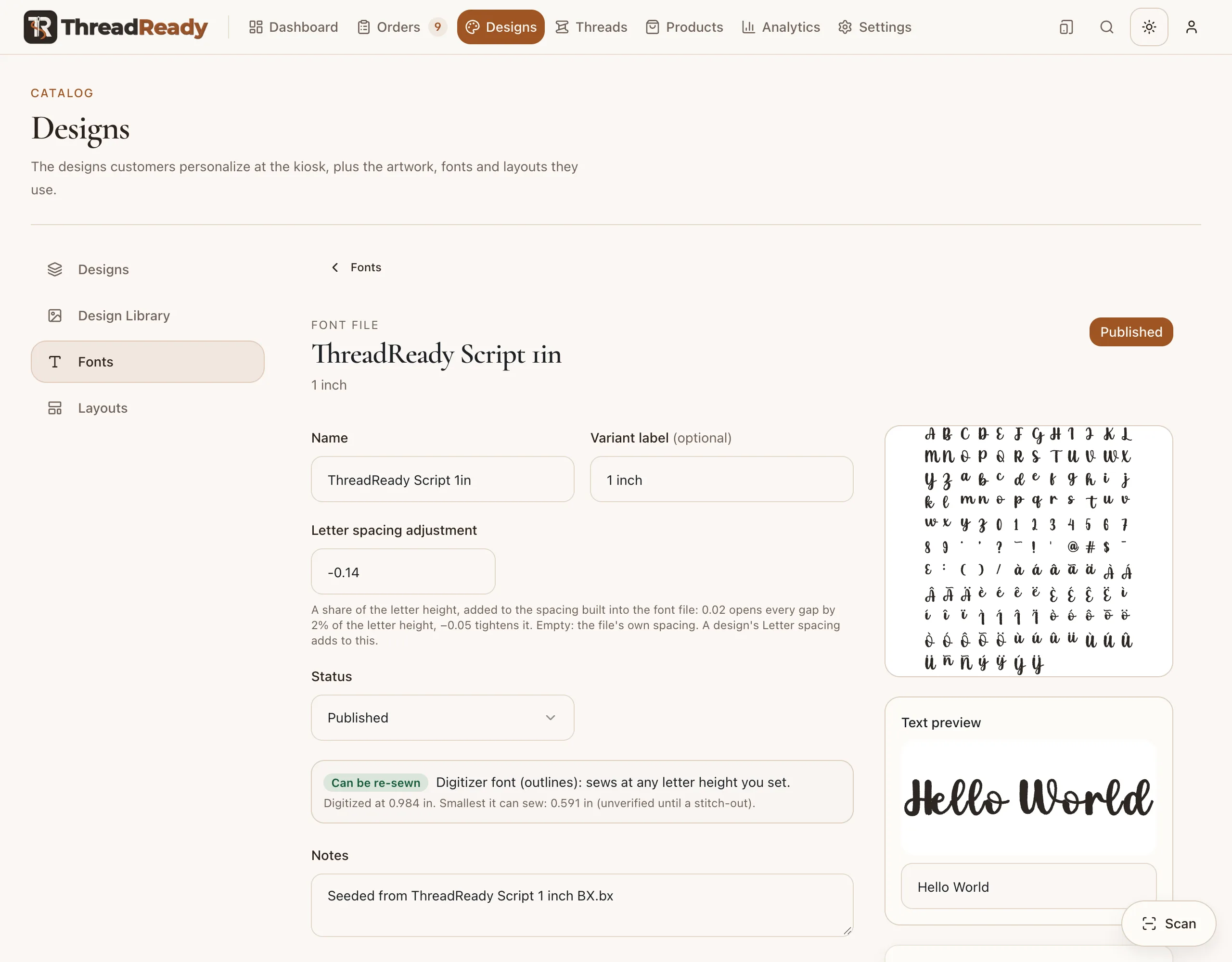
Works in ThreadReady. Shows as Can be re-sewn on the font's page.
Embrilliance's own Native fonts
built into the program
- Inside
- Object-based too, but stored in a protected form only Embrilliance opens.
- Sizes
- Sew at any size inside Embrilliance.
Not supported. Can't be uploaded: ThreadReady can't read them.
.bx file. What is inside decides how it sews.Stitch BX fonts
The letters are finished stitches: a digitizer made each letter as a stitch design at one size (say 2 inches) and packed them into a .bx. Most fonts sold by digitizers are this kind, and they usually come as one .bx per size (Script 1 inch, Script 1.5 inch, Script 2 inch…).
- They sew exactly as the digitizer made them, at their own size.
- They can't be enlarged, and they can only be shrunk a little: ThreadReady shrinks a stitch BX to no less than 60% of its size, because shrinking stitches makes them denser and stiffer. On the kiosk, text that is too wide is shrunk to 75% of a size before ThreadReady tries the next smaller file.
- So you need one file for each size you sell. Upload them all and ThreadReady groups them into one family, picking the size for the customer (see Which size is sewn).
ThreadReady calls these stitch-type fonts, and the font's page says Fixed size.
Native (Digitizer) BX fonts
The letters are objects: outlines with the digitizer's settings for how to fill them (satin columns, fills, underlay, density), but no finished stitches. These are the fonts people mean by a "native" BX font. They are made in digitizing software that saves lettering as objects, and are often sold as one file that sews "any size".
- ThreadReady sews the stitches from the outlines at the height each order needs, the way Embrilliance does, so a single file covers a wide range of sizes.
- Each font still has a smallest height it sews cleanly. ThreadReady measures it after you upload the font, and won't offer smaller sizes.
- ThreadReady's own fonts (ThreadReady Sans and Script) are this kind.
ThreadReady calls these Digitizer fonts (the type the file itself states), and the font's page says Can be re-sewn. ThreadReady sews them with its own stitch engine, following the font's settings. The result is very close to Embrilliance's but not always stitch-for-stitch the same, so sew a test before you sell a new font.
Embrilliance's own Native fonts
Embrilliance also comes with fonts of its own, built into the program. They are object-based too, but stored in a protected form that only Embrilliance opens, and they normally stay inside Embrilliance rather than being sold or shared as .bx files. ThreadReady can't read that protected form: a file in it is listed as This file could not be read as a font and isn't uploaded. If you like one of these, look for a BX font of the same style from a font designer, or use ThreadReady's own fonts.
"BX native" or "just BX"?
When a seller or a forum says native BX font, they almost always mean an object-based font that re-sews at any size (the second kind above). When they say BX font with nothing else, it can be either kind: the .bx file is only the container. To find out which kind you have:
- Read the listing. "Sizes included: 1, 1.5, 2 inch" or one file per size means a stitch BX. "Any size", "scalable" or "object-based" usually means a native one.
- Upload it as a draft and open its page. Under Designs → Fonts, open the font file: Fixed size is a stitch BX, Can be re-sewn is a native (Digitizer) one. The page also shows the size it was made at and the smallest it sews. A draft is never offered on the kiosk (see Draft, Published and Archived).
What ThreadReady does with a BX file
- Files it into a family by name, so all the sizes of a font are picked as one (see Font families).
- Measures the smallest size it sews cleanly, in the background, starting right after upload. Most fonts take a minute or two; large native fonts can take a quarter of an hour or more, and the font's card says smallest still being measured until it is done.
- Makes an open-format copy. Every BX also gets a copy in the Open Embroidery Format (
.oef), checked to sew exactly like the BX. Everything sews from that copy, so a font is offered once its copy has passed the check, usually within seconds. You can download both (see OEF and OED files). - Keeps your file. Download the BX on the font's page gives you the file exactly as you uploaded it. Each order keeps the font file it was sewn with, so replacing a font later never changes an order already placed.
Your font's licence still applies. Uploading a font to ThreadReady, or converting it to .oef, doesn't change who owns it or what its licence allows. Check that the licence lets you sell items stitched with it, and download it only for your own use.
Related
- Choosing BX fonts for your kiosk: what to look for before you buy.
- Make your own font from stitch files: turn an alphabet of letter designs into a font.
- Small lettering: fonts for names under half an inch.